Learn how to create your Ethereum wallet in easy-to-follow steps. Start managing your crypto assets securely today! Read the full guide now.
Cryptocurrency has revolutionized how we store and transfer assets, and Ethereum remains one of the most widely used blockchain networks. If you want to participate in the Ethereum ecosystem, you'll need an Ethereum wallet. This guide will walk you through the process of how to create an Ethereum wallet, covering different wallet types and security measures to keep your crypto safe.
How to Create Ethereum Wallet
Creating an Ethereum wallet is essential for managing digital assets on the Ethereum blockchain. The steps to create an Ethereum wallet is a straightforward process, but it requires careful attention to security. Here’s a step-by-step guide:
Step 1: Choose the Right Wallet Type
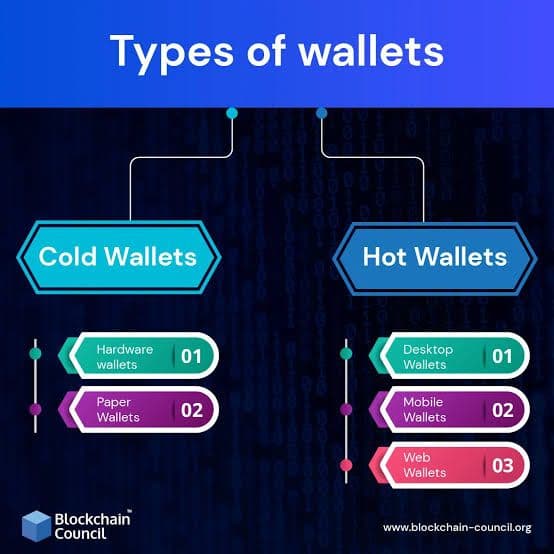
Ethereum wallets come in various types, including:
Each wallet type has its own security level, convenience, and accessibility.
Step 2: Download a Wallet App or Extension
Many Ethereum wallets are available as a browser extension, a mobile app, or a desktop application. Some of the most popular ones include:
MetaMask (available on the Chrome Web Store)
Coinbase Wallet Extension
Trust Wallet
Choose a digital wallet that suits your needs and verify it's from an official source. Wallet extensions are plugins for web browsers that enable users to interact directly with Ethereum's blockchain through their browser.
Step 3: Set Up Your Ethereum Wallet
Open the wallet app or browser extension.
Click "Create New Wallet."
Set a strong password to enhance security.
Save the secret recovery phrase (seed phrase) in a safe place.
Step 4: Secure Your Wallet
Your private keys should never be shared. Store them in a physical wallet or a hardware wallet for maximum security. Avoid phishing scams and always double-check URLs before entering sensitive data. When using an Ethereum wallet, always follow security best practices:
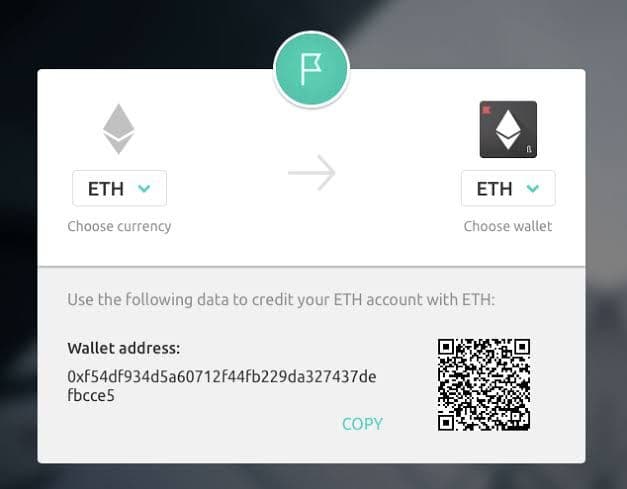
Use this wallet address to receive Ether or interact with Ethereum apps.
Always confirm Ethereum transactions before sending.
Now that you've created your Ethereum wallet, let's explore the different wallet types in more detail.
1. Hot Wallets
Hot wallets are connected to the internet and allow you to store, send, and receive Ethereum with ease. These wallets are ideal for users who frequently trade or interact with decentralized applications (dApps).
Advantages of Software Wallets:
Fast and convenient – Instant access to funds for transactions and trading.
User-friendly – Easy to set up and use, even for beginners.
Free to use – Most hot wallets are free to download and use.
Disadvantages of Software Wallets:
Higher risk of hacking – Since they are always online, they are more susceptible to cyberattacks.
Phishing risks – Hackers can trick users into entering private keys or seed phrases on fake websites.
Popular Software Wallets:
MetaMask – A widely used browser extension and mobile wallet for managing Ethereum-based assets and interacting with dApps.
Trust Wallet – A secure mobile wallet with built-in Web3 functionality for Ethereum and other blockchains.
Coinbase Wallet – A user-friendly option that allows for secure Ethereum storage and seamless interaction with dApps.
Best for:
Users who trade frequently, interact with dApps, or need quick access to their funds.
2. Cold Wallets
Cold wallets are physical devices designed to store your Ethereum private keys offline. These wallets provide the highest level of security and are best suited for long-term storage of large amounts of cryptocurrency.
Advantages of Cold Wallets:
Maximum security – Since they are offline, they are immune to hacking attempts.
Protection from malware – Unlike software wallets, cold wallets are not vulnerable to computer viruses.
Backup and recovery – Most hardware wallets come with a recovery seed to restore access if the device is lost.
Disadvantages of Cold Wallets:
Not as convenient – Requires plugging in the device to send or receive funds.
Expensive – Hardware wallets typically cost between $50 to $200.
Popular Cold Wallets:
Ledger Nano X – A secure hardware wallet with Bluetooth connectivity.
Trezor Model T – A user-friendly and highly secure option for offline Ethereum storage.
SafePal S1 – A budget-friendly cold wallet with strong security features.
Best for:
Users who prioritize security over convenience and want to store large amounts of Ethereum safely.
3. Mobile Wallets
Mobile wallets are a type of hot wallet designed for smartphones and tablets. They offer convenience and accessibility, making them ideal for people who need on-the-go access to their Ethereum funds.
Advantages of Mobile Wallets:
Highly accessible – Manage funds directly from your smartphone.
Supports QR code transactions – Makes it easy to send and receive payments.
Integration with dApps – Many mobile wallets support Web3 browsing.
Disadvantages of Mobile Wallets:
Less secure than hardware wallets – Susceptible to hacking and malware attacks.
Dependent on the phone’s security – If your phone gets stolen or compromised, your wallet might be at risk.
Popular Mobile Wallets:
Trust Wallet – A multi-cryptocurrency wallet with built-in dApp support.
Argent – A non-custodial mobile wallet designed for Ethereum and DeFi.
Coinomi – A secure mobile wallet that supports multiple cryptocurrencies, including Ethereum.
Best for:
Users who need quick and easy access to their Ethereum wallet on their mobile device.
4. Paper Wallets
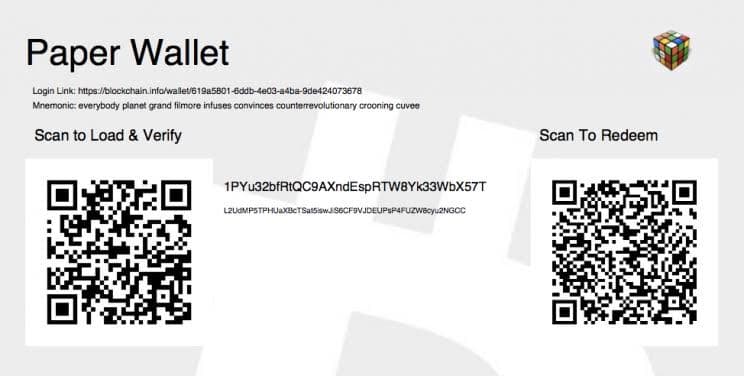
A paper wallet is a physical printout of your Ethereum private key and public wallet address. Since it is completely offline, it offers an extremely secure way to store Ethereum, provided it is kept safe from physical damage or theft.
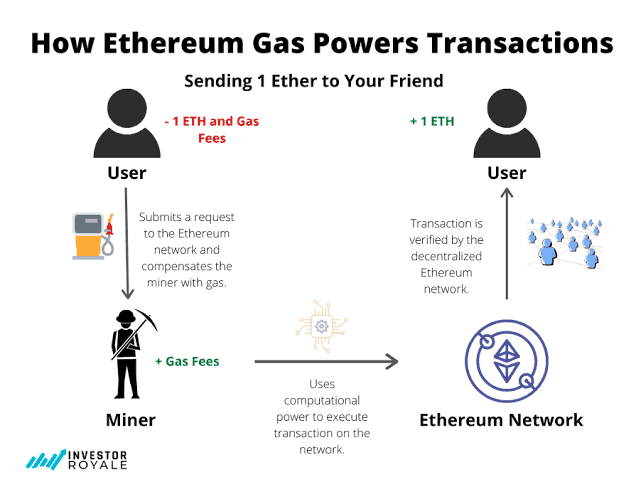
Every transaction on Ethereum requires gas fees, measured in Gwei (1 Gwei = 0.000000001 ETH). Gas is a unit of account within the EVM used in the calculation of the transaction fee, which is the amount of ETH a transaction's sender must pay to the network to have the transaction included in the blockchain. Each type of operation performed by the EVM is hardcoded with a certain gas cost, which is roughly proportional to the monetary value of the resources a node must expend to perform that operation.
When a sender creates a transaction, they must specify a gas limit and gas price. The gas limit is the maximum amount of gas the sender is willing to use in the transaction, and the gas price is the amount of ETH the sender wishes to pay to the network per unit of gas used. In user interfaces, gas prices are typically denominated in gigawei (Gwei), a subunit of ETH equal to 10−9 ETH.
Which Ethereum Wallet Should You Choose?
The best wallet for you depends on your specific needs:
For convenience & dApp interaction → Use a software (hot) wallet like MetaMask or Trust Wallet.
For high security & long-term storage → Choose a hardware wallet like Ledger Nano X or Trezor Model T.
For mobile access → Trust Wallet and Argent are great mobile wallet options.
For ultra-secure cold storage → A paper wallet is the safest option if stored properly.
Final Thoughts
Creating an Ethereum wallet is a crucial step in managing and securing your crypto assets. Whether you trade frequently, hold long-term, or interact with dApps, selecting the right wallet will ensure your funds remain safe and accessible.
Always prioritize security, keep your private keys private, and use the best wallet that aligns with your usage habits.
FAQs
How do I store my Ethereum securely?
Use a hardware wallet or store private keys offline. Always double-check websites to avoid phishing scams.
What is a recovery phrase?
A seed phrase is a set of words used to restore your Ethereum wallet if you lose access. Writing your seed phrase down on paper is safer than storing it on a computer.
Can I use multiple Ethereum wallets?
Yes, you can use different wallets for various purposes, such as hot wallets for daily transactions and cold storage for savings.
What is the best Ethereum wallet for beginners?
MetaMask and Trust Wallet are excellent choices due to their user-friendly interfaces and ease of use.
Is a paper wallet a good option?
A paper wallet offers enhanced security but is less convenient for frequent transactions. Paper wallets print public and private keys on a physical medium, storing them offline for security.
Disclaimer
This article is provided for informational purposes only and does not constitute legal, financial, or professional advice. All content is based on publicly available information and personal opinions. Readers are advised to seek professional guidance before making any decisions or taking any actions based upon the material presented. The author and publisher assume no liability for any actions taken or not taken by the reader based on the information contained herein.