How to Use It, Pay Network Fees and Cash Out Safely
Key takeaways
A DeFi wallet is a crypto wallet that only you control. Your recovery (seed) phrase restores it on any device.
Four things change compared with an exchange or payment app: you pay network fees in the network's own coin, guard your recovery phrase yourself, approve every transaction and need a service to cash out.
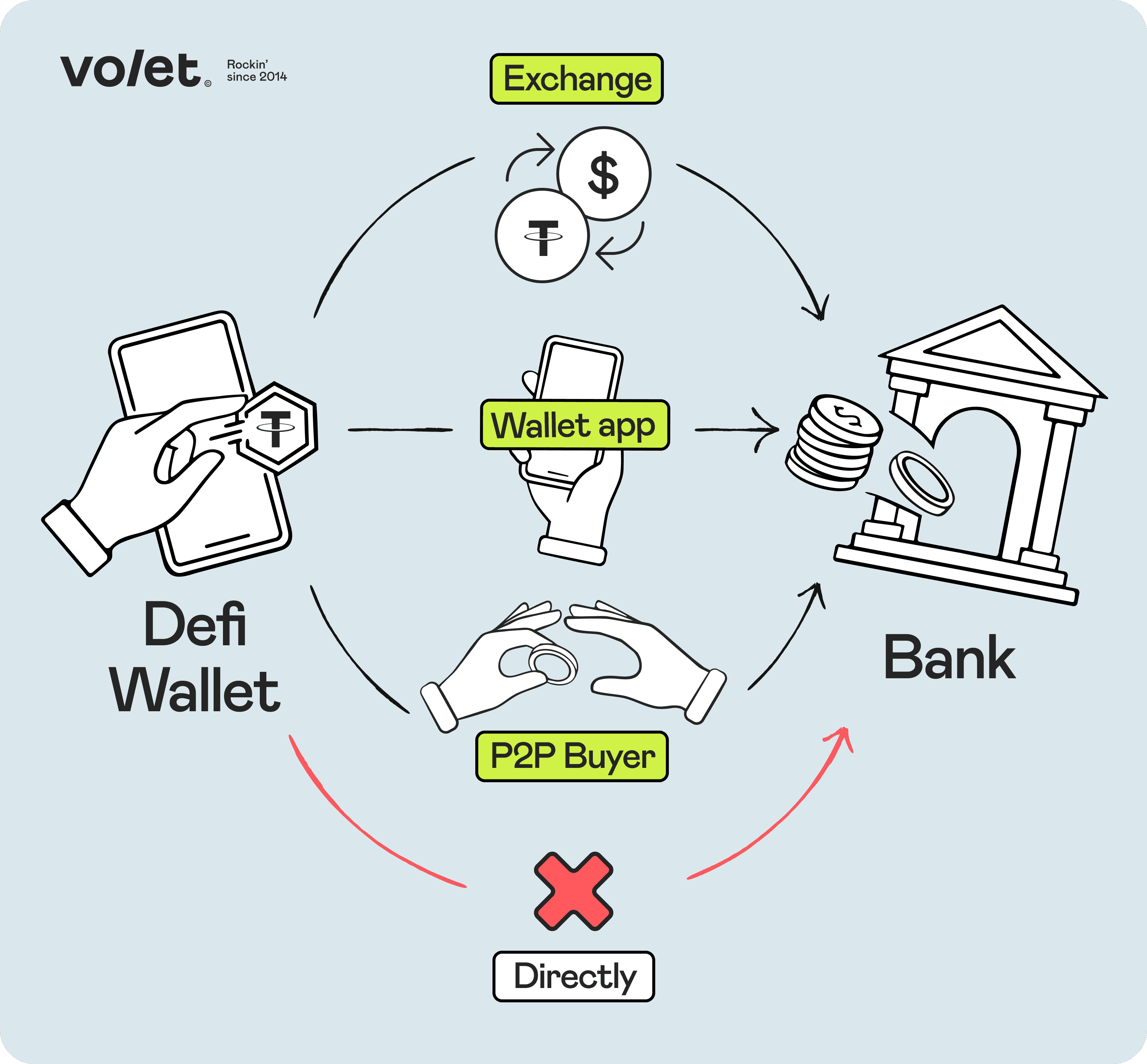
To cash out to regular money (fiat), you first send crypto to an exchange, a wallet app with bank withdrawals or a person who buys it from you.
If you get paid or cash out often, keep savings in a DeFi wallet and move money in and out through an account with an exchange or payment app.
What can a DeFi wallet do that an exchange or payment app can't?
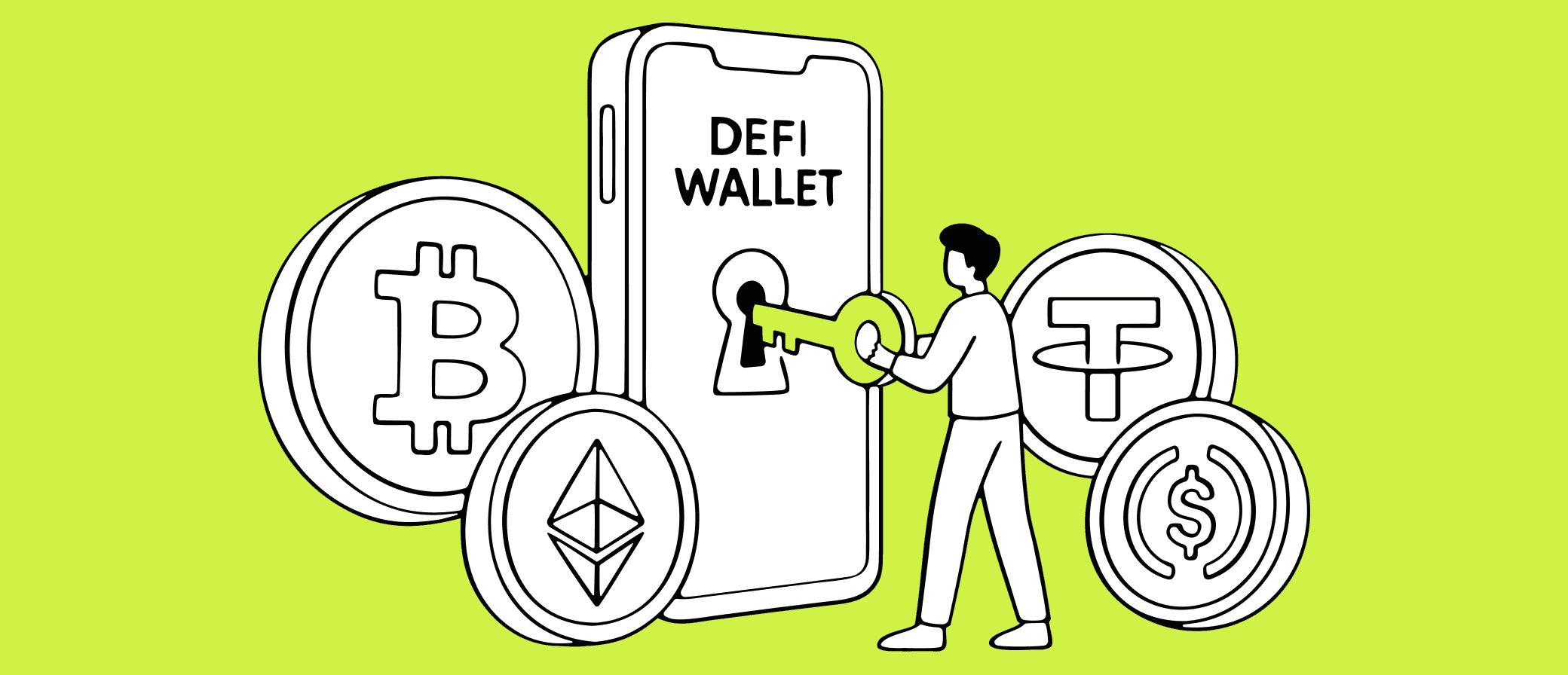
A DeFi wallet is a crypto wallet where you, and only you, hold the keys to your money. It is also called a self-custody or non-custodial wallet.
The wallet doesn't store coins. They live on a blockchain, a public record of transactions that no single company controls. The wallet stores the keys that prove the coins are yours and signs your transactions with them. A recovery phrase (also called a seed phrase) backs up the keys: 12 or 24 words that restore the wallet on any device. Whoever has the phrase controls the money.
A custodial account works differently: the company holds the keys for you, and you log in with a password. Exchanges such as Binance or Coinbase and wallet apps such as Volet.com work this way. A lost password is easy to fix, but you follow the company's rules: it can ask for verification, set limits or temporarily block your account.
Popular DeFi wallets include MetaMask, Trust Wallet, Phantom and TronLink. They are free mobile apps or browser extensions. Creating one usually takes no sign-up: no email, phone number or ID check.
With a DeFi wallet, you can:
Connect to decentralized finance (DeFi) apps. These are services, such as trading and lending apps, that work without a company in the middle. They let you swap one coin for another on a decentralized exchange, move USDT to a cheaper network, lend stablecoins or sign in to apps with your wallet instead of a password. Your balance on an exchange or in another custodial account can't connect to these apps, because you don't hold its keys.
Get paid by anyone. Share your address, and a client or platform anywhere can send you stablecoins and other crypto with nobody sitting in the middle.
Keep money outside any platform. If an exchange goes bankrupt or stops withdrawals, coins in your own wallet are not affected. Even if your wallet app shuts down, your recovery phrase restores the money in another compatible wallet app.
How do you set up a DeFi wallet and move money into it?
It takes a few minutes. What matters most is the right network and a safe backup of your recovery phrase.
Pick a wallet that supports your network. Ask which network the payment will come on. For instance, USDT on TRON needs a wallet that supports TRON, such as Trust Wallet, TronLink or MetaMask.
Install it from the official website or app store. Fake wallet apps and search ads that copy real ones are common. Double-check the web address before you download.
Write down your recovery phrase on paper and keep it offline. Don't photograph it, save it in the cloud or type it into any website.
Add a little of the network's own coin to pay fees. You need TRX to move USDT on TRON, ETH on Ethereum and Base, SOL on Solana.
Send a small test amount first. When it arrives, send the rest.
How network fees work
Every transfer needs a network fee, also called gas, and you pay it in the network's own coin, not in USDT. That's why a wallet holding 500 USDT and no TRX can't send anything on TRON.
Three ways to avoid getting stuck:
Keep a little of the network's own coin on the same network as your USDT.
Use a wallet that covers the fee. Some wallets pay the TRON fee for you or let you pay it in USDT, at a small extra cost.
Pick the cheapest network both sides support when you have a choice.
Keep the recovery phrase offline, separate savings from everyday money and make sure someone you trust can reach your funds if you can't.
Treat the recovery phrase as the master key. Keep two copies on paper or metal in separate safe places. Before you move savings in, test the backup: restore the wallet from the written phrase and check that the same address appears.
Anyone who asks for your phrase, including "support", is a scammer, even if they use a real wallet's name. Most wallets have no phone support, so treat a "support number" from web-search results as a scam too.
Split money by purpose. Use a phone wallet for payments and a separate wallet for savings you rarely touch. For larger sums, a hardware wallet (a small device such as Ledger or Trezor) keeps the keys offline.
Consider a passkey wallet. Some newer wallets replace the phrase with a passkey: you approve transfers with Face ID or a fingerprint. Your access then depends on the Apple or Google account or password manager where the passkey is backed up.
Leave instructions. No support team can unlock your wallet for your family. Write down where the phrase or device is and how to use it, and warn your family never to type the phrase into a website.
Good instincts. Check the rules below to close the gaps.
These traps catch many people. The three rules below will help protect you.
Spot the trap: a DeFi wallet safety game
Nine quick situations you can meet in your own wallet, in three levels. Pick what you would do. After each answer, you'll see why.
Level 1 · Basics · 1 of 3
A swap site asks your wallet for something. Which request is safe to accept?
Right. Connecting shows the site your address and balance, but nothing leaves your wallet without your approval. No real site or support team asks for your recovery phrase.
Never do this. Whoever has your recovery phrase controls your money. No real site or support team asks for it.
A swap site doesn't need a payment to “activate” your wallet. Connecting is free, and that USDT would go to a scammer.
Level 1 · Basics · 2 of 3
You're paying a designer 300 USDT on TRON. Which address in your history matches the invoice?
Invoice
T8MZ Zix7 yFzf gcTs dcvo rrYq reVG 1g68 Ku
Copied from the invoice
Your transfer history
Right. Look-alikes copy the first and last characters, so the middle is where they give themselves away.
Even better. You copied the address straight from the invoice, not from your history. Just check the pasted address before you send.
Not this one. It matches only at the start and the end. Scammers plant look-alike addresses in your history on purpose. This is called address poisoning.
Level 1 · Basics · 3 of 3
You get this message in a chat app. What do you do?
Wallet Support: unusual activity on your wallet. Reply with your recovery phrase within 1 hour to keep your funds safe.
Right. Real support never asks for your phrase and doesn't message you first in chat apps. The deadline is there to make you panic.
There's nothing to check here. Anyone who asks for your phrase is a scammer, even with a real wallet's name and logo.
Level 2 · Harder fakes · 1 of 3
You started a swap of 50 USDT on a site you trust. Your wallet asks for permission to spend your USDT. Which option do you pick?
Right. Approve the exact amount for a swap you started yourself. Later, cancel old approvals with an approval checker.
An unlimited approval is like a blank check. If the site is hacked or turns out to be a scam, it can take all your USDT later.
Swaps do need an approval. Just keep it to the exact amount, and only for things you started.
Level 2 · Harder fakes · 2 of 3
Same payment, new invoice. This time the look-alikes are closer. Which address matches the invoice?
Invoice
Ttqx fyYS aHwT dXZa t2dF r9u4 nayj 7ngU XA
Copied from the invoice
Your transfer history
Right. These fakes matched even more characters at the start and end, but the middle still gave them away.
Even better. Copy from the invoice, then check the pasted address against it.
Not this one. The start and end match, but the middle is different. Scammers can match more characters at the edges, so always check the middle.
Level 2 · Harder fakes · 3 of 3
A transfer is taking long, so you look for help. Which option is safe?
Right. Most wallets have no phone support, and real admins don't message you first. Use only the help links on the official site.
That's a common trap. Fake support numbers and “admins” who message you first are run by scammers.
Level 3 · Pro level · 1 of 3
A site asks you to sign a message to “log in”. Do you sign?
Signature request
Network fee: none
Details: permission to spend USDT, amount: unlimited
Right. Some requests look like a free sign-in but give the same permission as an approval. If the details mention spending, reject.
Free doesn't mean safe. This message gives the site the right to spend all your USDT, without a single network fee.
Too late by then. Once you sign, the site can use the permission right away. Reject requests you didn't expect.
Level 3 · Pro level · 2 of 3
New invoice, three look-alikes in your history again. How do you get the right address?
Invoice
TFwy 8hmW kXnb HcSj Lcti ZmXt ySUD KvJ1 3A
Copied from the invoice
Your transfer history
Right. None of the three matched. Copy the address from the original source every time, never from your history.
None of the three matches the invoice. The safe move was the small copy icon next to it: always copy the address from the original source.
Level 3 · Pro level · 3 of 3
Scammers stole your USDT. Then a “fund recovery” company emails you. What do you do?
Licensed experts. We've helped thousands of victims. Pay a 10% fee upfront and we'll get your money back.
Right. Blockchain transfers can't be reversed, and upfront-fee “recovery” offers are a common second scam.
That's how a second scam starts. Blockchain transfers can't be reversed, and no one can promise to get your money back for a fee.
Level 1 done.
Next: harder fakes. Ready?
Level 2 done.
Next: pro level. The traps get sneakier.
Your result
0 of 0 correct
These traps catch many people. The three rules below will help protect you.
Three rules to remember
Check the whole address, and copy it from the original source.
Read what you sign: allow spending only for the exact amount, and only for actions you started.
Real support never asks for your phrase and doesn't message you first in chat apps.
Before you sign a request (approve it in your wallet), check what it will do. Attackers often go after people rather than apps. In 2025, blockchain analytics firm Chainalysis counted about 158,000 thefts from personal wallets, worth about $713 million.
Connecting is not paying. Connecting your wallet to a site only shows it your address. The risk starts when the site asks you to sign.
Treat an approval like a blank check. Many apps ask for permission to spend your coins. If you give a scam app unlimited permission, it can take your coins weeks later.
Where you can, approve only the exact amount. Cancel (revoke) old approvals with an approval checker: Revoke.cash, or TronScan for TRON. Open the checker from its official site.
Read the preview. Many wallets now show what will leave your wallet before you confirm. If the preview shows more than you expect, cancel.
Check the whole address. Scammers send tiny transfers from look-alike addresses. They start and end with the same characters as an address you've used, so you may copy the fake one from your transaction history. This is called address poisoning.
Copy the address from the original source, not from past transactions, and check the middle characters too.
A DeFi wallet can't send money to a bank directly. Cash out through an exchange, a custodial service or a P2P buyer
How do you cash out from a DeFi wallet?
A DeFi wallet can't send money to a bank by itself. Instead, you send your crypto from the DeFi wallet to a service that converts it to local currency and pays it out to your bank account.
Route
How it works
Good to know
Crypto exchange
Deposit, sell for local currency, withdraw to your bank
Requires identity verification; supports many coins
Custodial wallet with withdrawals, such as Volet.com
Deposit stablecoins, withdraw to a local bank account
Identity verification unlocks more methods and higher limits; check which currencies and methods are available to you
P2P (peer-to-peer) marketplace
Sell to another person who pays you by bank transfer
You rely on the buyer being honest and can be subject to bank compliance rules
Send USDT, USDC or other major coins from your DeFi wallet to your Volet.com deposit address, then withdraw to a local bank account in one of the supported currencies.
Volet.com charges 0% for crypto deposits. You pay only the blockchain network fee, because you're the sender. Automatic conversion of USDT or USDC on arrival costs 1 USD. Local bank withdrawals start from 1%.
Your USDT balance is shared across nine supported networks, including TRON, Ethereum, BNB Smart Chain and Solana.
When do you need both a DeFi wallet and a custodial account?
When you get paid or cash out regularly: keep savings in a DeFi wallet you control and let a custodial account handle money coming in and going out.
Leave to a custodial account
Handle in your DeFi wallet
Payments from clients and platforms that pay only to an account
Long-term savings
Converting stablecoins and withdrawing to your bank
Your keys and recovery phrase
Support and access recovery if you lose your password
Approving every transaction
A custodial account such as Volet.com fits the "money in, money out" role: receive stablecoins, convert them and withdraw to a bank. The trade-off is trusting the provider with that money. Opening a Volet.com account is free.
Product and company names mentioned in this article are trademarks of their respective owners. Volet.com is not affiliated with or endorsed by them.
Accept USDT, USDC, and leading crypto tokens worldwide
Start with the crypto payment gateway — instant settlements and fees from 0.25%
It is as safe as the way you use it. The main risks are a leaked recovery phrase and a signed scam request. Keeping the phrase offline and checking what you sign protects you from both.
Not if you still have your recovery phrase.
Install a compatible wallet app on a new device, choose "restore" or "import" and enter the phrase.
If someone may have seen your phrase, move the money to a new wallet with a new phrase.
Act fast. Cancel the app's permissions with an approval checker. Then move any remaining funds to a new wallet with a new recovery phrase, because the old one may be exposed.
Blockchain transactions can't be reversed, and anyone who offers to "recover" your money for a fee is almost certainly a scammer.
For most coins, no.
USDT and USDC are different: the companies that issue them, Tether and Circle, can block the coins on a specific address, even in a wallet you control. If it happens, getting the coins back is hard: issuers lift a freeze only occasionally, usually after an investigation ends or a court decides.
For an ordinary wallet, the risk is small. To keep it that way, accept stablecoins from people and services you know, and keep proof of where payments came from.
Usually from minutes to a few business days.
Sending coins from your wallet to an exchange or a custodial account takes minutes on most networks. Large or first-time deposits can go through extra checks.
The bank transfer is usually the slowest part and depends on the service, the currency and your bank.